Spellbound & Shelved Controls
Every click the idle actually uses — and the keys it does not.
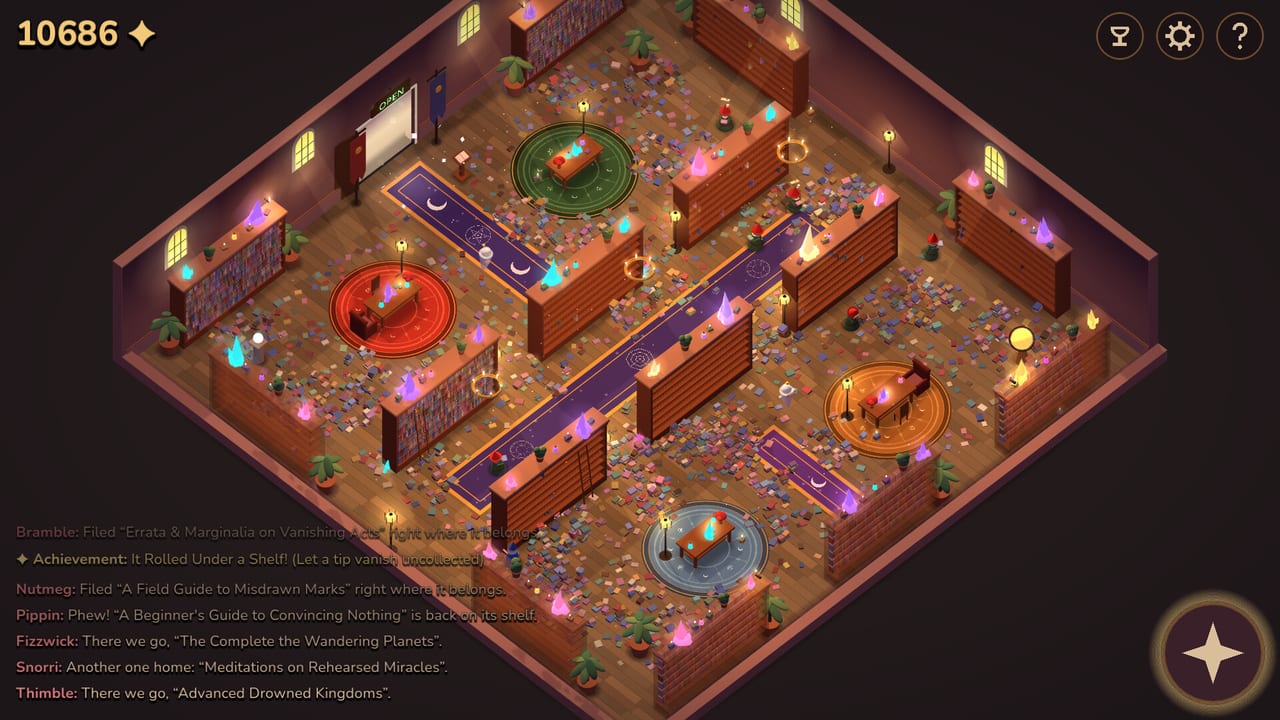
Spellbound & Shelved is a mouse-first idle. Steam lists Mouse Only and Touch Only, a required mouse on desktop, and no timed inputs. You do not WASD a gnome across the academy. You click the library, hover the upgrade web, and flip a plaque. This page is the input map so How to Play can stay on HUD meaning instead of button locations.
If a video is easier than a list, the walkthrough embeds a community let’s play of a full tidy. The official trailer still lives on the Steam store page, not on YouTube.
Desktop mouse
- Left click a gnome to pep-talk them into a sprint. Named hats in the log include Fizzwick, Bramble, Nutmeg, Pippin, Snorri, Thimble, Wobble, and Juniper. Pep-talks are optional; they never replace hiring. Details: tips and the gnome roster.
- Left click a reader to usher them out when they loiter after you flipped CLOSED. Readers pay and unshelve. Ushering is a leak-plug, not a combat kick. Roster: readers.
- Left click a tip coin before it fades. Missed tips feed the joke trophy It Rolled Under a Shelf on the achievements list.
- Left click the door plaque to toggle OPEN and CLOSED. That is the whole economy. Strategy: door-sign guide.
- Hover an upgrade node on the radial web to read cost and job. Click to buy when you have diamonds. Do not guess names — the tree is a gold constellation, not a list.
There is no right-click context menu worth learning. There is no hold-to-charge. Clicks are discrete: pep, usher, snatch, flip, buy.
Camera
The isometric room uses a bottom-right compass as a camera helper. Pan so you can see chained shelf wings and coins that rolled under a case. If a cover is “gone” at the finale, pan every rug before you assume a stuck-book bug.
The upgrade overlay is a second camera: drag to pan, mouse wheel to zoom, hover for details. The close button is labeled Close (U). Press U again if the overlay ate the library. Shopping order: upgrade tier list.
Keyboard
The one shortcut the overlay prints is U. Treat anything else as unverified. We will not invent WASD gnome steering, a pause key that is not the plaque, or a debug console. Save is listed as save anytime in Steam’s accessibility block — use the in-run flow, not an assumed F5.
Settings and help sit in the top-right gear and question-mark icons, also on the title screen. Volume sliders live there (custom volume is a store accessibility flag). Language follows the Steam install: English, French, German, Spanish.
Touch and tablets
Steam’s Touch Only option exists so a session can be playable without a mouse. Tap maps to the same verbs: pep, usher, snatch, flip, buy. The upgrade web still wants pan and pinch-or-wheel zoom; if nodes are too small, zoom in before you buy the wrong leaf. Play-at-your-own-pace and no required timed inputs mean you can put the tablet down during CLOSED tidy time.
Touch is not a second campaign. The library, the 6,655 books, and the six reader types are the same run.
Steam Deck and handhelds
Steam Deck compatibility was Unknown on the store capture. Mouse-required still matters in desktop mode. Touch Only suggests a trackpad or touch session can work. We will not stamp Verified. If you play in Game Mode, map a face button to click and a pad to the compass; the overlay still wants hover. Specs and Deck notes: system requirements.
What is not a control
- No shared-screen second manager. Single-player only. If a prompt asks you to invite a friend, you are in the wrong Spellbound.
- No controller highlight tour of 200+ nodes. Hover is the design. A stick can move a cursor; it will feel worse than a mouse on the web.
- No combat buttons. Pep-talk is a sprint, not an attack.
- No redeem field. There are no official codes at launch.
- No chat. The activity log is gnome chatter, not a multiplayer feed.
Accessibility recap
Steam flags: custom volume, Mouse Only, Touch Only, playable without timed input, save anytime, play at your own pace. The optional speedy / 90-minute trophy is a challenge clock, not an accessibility requirement. If clicks miss, zoom the web. If hats vanish, that is pathing — troubleshooting — not a missed keybind.
Learn these verbs, then go back to Getting Started for the first-hour checklist, or forward to the walkthrough if you already know where the plaque is. The academy does not need a fighting-game input chart. It needs a librarian who can find U and the door.
Frequently Asked Questions
Quick answers for the idle library.
What are the Spellbound & Shelved controls?
Mouse or touch: click gnomes, readers, tips, and the door. Press U for the upgrade web. Full map on this page; HUD meaning is in How to Play.
Is there a controller scheme?
Steam lists mouse required plus Touch Only. There is no published gamepad overlay for the 200-node web. Deck compatibility was Unknown.
Does U pause the game?
No. U closes (and opens) the upgrade overlay. CLOSED on the door sign is how you stop readers.