How to Play Spellbound & Shelved
HUD, shortcuts, and the three optional clicks that never become chores.
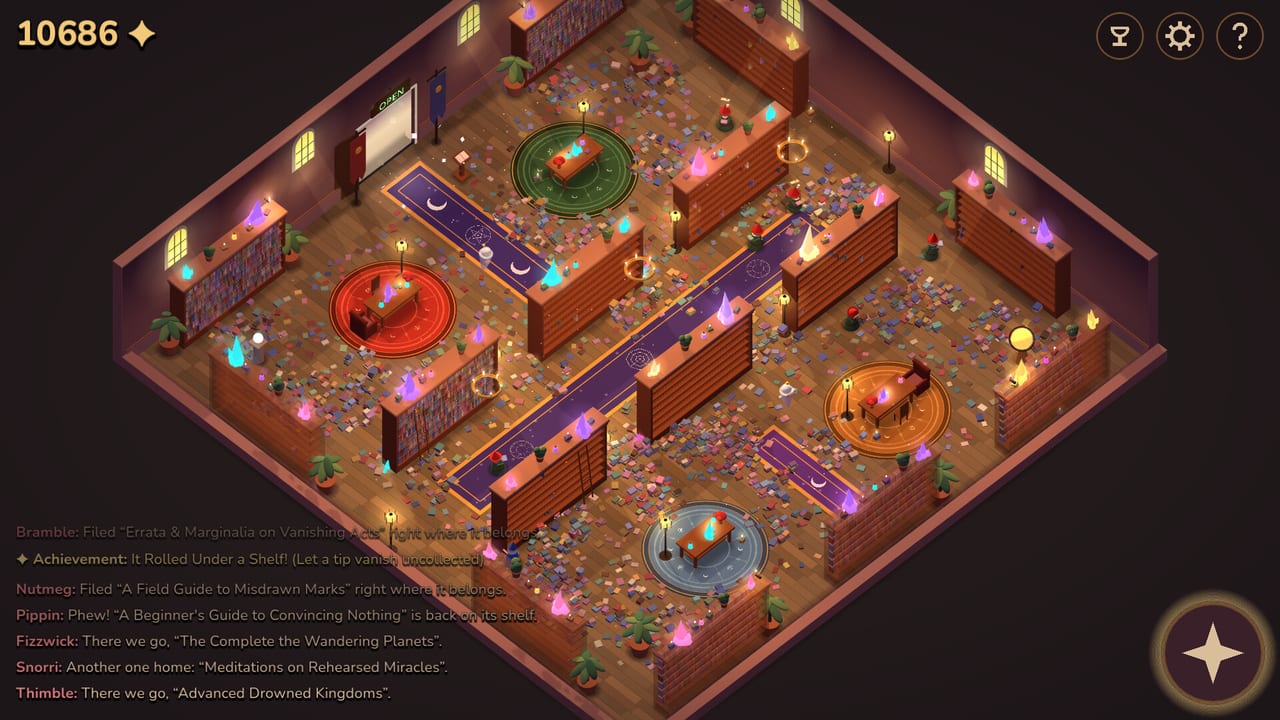
Spellbound & Shelved is an idle management game, not a hidden-object hunt. If you came here asking how to play, the honest answer is: hire, flip, spend, watch. This page is the HUD reference so the getting started loop has meaning attached. Button locations live on controls.
Steam lists Mouse Only and Touch Only options, custom volume, play-at-your-own-pace, no required timed inputs, and save anytime. That matches the store promise that you can pep-talk a gnome — or touch nothing and let the library breathe.
HUD map
- Top-left diamonds. That is your gold. Early runs show tiny numbers (20). Mid-library screenshots sit around five figures. The upgrade web can display absurd late totals; treat that as a sandbox readout, not a speedrun requirement.
- Door plaque. The entrance shows OPEN in green when customers may enter. CLOSED is the tidy mode. This is the master lever described in the door-sign strategy.
- Top-right trio. Trophy (achievements), gear (settings), question mark (help). Achievement hunting has its own page: achievements.
- Bottom-right compass. Camera helper for the isometric room.
- Bottom activity log. Gnome chatter plus reader payouts. Example lines: Bramble: Filed “Errata & Marginalia on Vanishing Acts” right where it belongs. and Lom the Cat: Read “On the Nature of Levitation” in one sitting! (+600).
- Upgrade overlay. Press U to close (the button is labeled Close (U)). Header text: DRAG TO PAN · WHEEL TO ZOOM · HOVER FOR DETAILS. The tree is a gold radial web, not a linear list.
Core verbs
Hire. Named gnomes include Fizzwick, Bramble, Nutmeg, Pippin, Snorri, Thimble, Wobble, and Juniper. Steam also highlights Fizzwick Mastered and Bramble Mastered, so mastery is a real progression flag, not just flavor. Roster notes live on the gnome page.
Flip. OPEN sells access to the mess. CLOSED silences the till and lets filing win. If you only remember one rule from this wiki, remember that income and mess share a source. The door-sign planner turns that into a rhythm.
Spend. More than 200 upgrades sit on the web. Fifteen shelf wings stay chained until you buy their chains off. Do not max a pretty leaf while a chained wall is still your only expansion. Rankings: upgrade tier list and wings.
Optional clicks. Snatch tip coins before they fade. Pep-talk a gnome into a sprint. Usher a dawdling reader out. These are the “want something to do?” layer from the store page. They never replace hiring and flipping. See tips.
Input notes
Mouse is the intended default. Hovering upgrade nodes is how you read costs; the tree is too dense for a controller-style highlight to be the primary design. Touch Only exists for playable-at-your-own-pace sessions. There is no shared-screen session and no online session to host. If a prompt asks you to invite friends, you are in the wrong Spellbound.
Volume and accessibility toggles live in Settings from the title screen and the in-run gear icon. Because the game is an idle, you can tab out; gnomes keep waddling. Use that during CLOSED stretches when you are waiting for the floor count to fall.
How a session feels
A healthy session alternates. OPEN until gold funds the next hire, wing, or web node. CLOSED until the activity log is a stream of “shelved and done” instead of reader fanfare. Repeat until the last book leaves the floor — the store’s stated finale. The walkthrough puts clock estimates on those swings.
If the room looks empty of shelves, you are early: chained wings and unbought racks are the map. If the room is almost full and the log still screams about tips rolling under a shelf, you are in optional-click territory and can ignore it unless you want the It Rolled Under a Shelf achievement on purpose.
Learn the HUD here, then go back to Getting Started if the first hour still feels loud, or forward to Door Sign if you already know where the buttons are.
Frequently Asked Questions
Quick answers for the idle library.
What does the U key do?
It closes the upgrade overlay (the button reads Close (U)). Open the tree from the same flow, then pan, zoom, and hover. Shopping order is on the upgrade tier list.
Can I play Spellbound & Shelved without clicking?
Yes. Pep-talks, tip snatches, and ushering are optional. The idle core is hire, upgrade, unchain, and flip the door sign.
Where is the currency shown?
Yellow diamonds in the top-left of the isometric HUD. Reader payouts also print in the activity log, such as Lom the Cat’s +600.